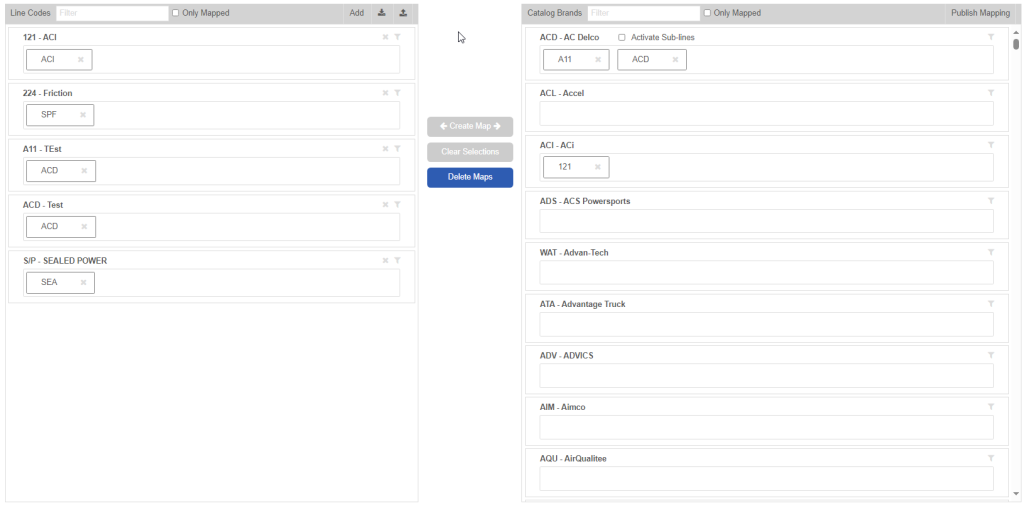
Code to Code Mapping
This mapping tool allows you to cross reference line codes (MFR codes) used by your system, to the ones used by our catalog.
To access this tool, go to the main menu, and select ‘Code to Code Mapping’.
On this page, you can upload your own line codes for the Upload button:

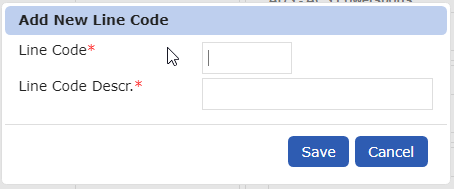
This is done with a CSV file format, in a simple format of (Line Code, Description, Catalog Code). You can also click the ‘Add’ button, to manually add codes if you only have a couple of different codes to map. Example shown here:
To actually map your code that you have either manually entered or imported, click your code on the left, and the corresponding Catalog Code, then click the ‘Create Map’ button.
- You can do one to one, one to many, or many to one mapping types.
** An important note, you will need to click ‘Publish Mapping’ in order for your changes to be reflected in the catalog. **
** Additional note – you can Export your mappings at any time, using the Export button along the Line Codes header on the left.